在今天的文章中,我们将把难题的最后一块放在原处。我们将向您介绍SOC的案例管理部分。我们使用了两种开源技术-TheHive和Cortex。
TheHive将用作我们项目的警报管理平台,该平台可以管理从创建到关闭的事件警报。同时,Cortex是与TheHive相同团队的补充软件产品,该产品以其“解析器”和“响应器”提供的数据丰富功能对其进行了补充。
所有职位的目录。
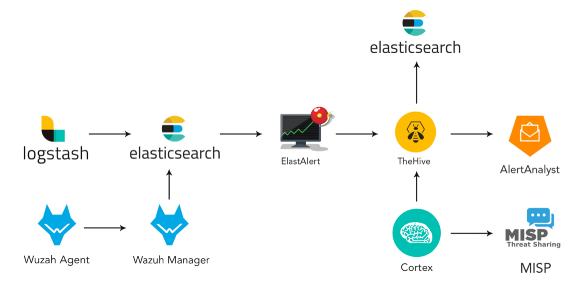
本文分为以下几节:
- 安装和配置TheHive和Cortex。
- TheHive和Cortex概述工具栏
- TheHive与Cortex集成
- MISP安装并与TheHive集成
- 调查:案件管理
1- TheHive Cortex:
TheHive 3.4.0–1 Cortex 3.0.1–1.
TheHive , Elasticsearch . docker-compose, Docker. Elasticsearch , Docker.
:
https://github.com/TheHive-Project/TheHiveDocs/blob/master/installation/install-guide.md
. TheHive ElasticSearch . Java. 8vCPU, 8 60 . .
. : docker-compose.yml Elasticsearch, TheHive Cortex :
version: "2"
services:
  elasticsearch:
    image: elasticsearch:6.8.0
    ports:
      - "0.0.0.0:9200:9200"
    environment:
      - http.host=0.0.0.0
      - cluster.name=hive
      - thread_pool.index.queue_size=100000
      - thread_pool.search.queue_size=100000
      - thread_pool.bulk.queue_size=100000
    ulimits:
      nofile:
        soft: 65536
        hard: 65536
  cortex:
    image: thehiveproject/cortex:3.0.1
    depends_on:
      - elasticsearch
    ports:
      - "0.0.0.0:9001:9001"
  thehive:
    image: thehiveproject/thehive:3.4.0
        depends_on:
      - elasticsearch
      - cortex
    ports:
      - "0.0.0.0:9000:9000"
    command: --cortex-port 9001
/ docker-composer.yml :
sudo sysctl -w vm.max_map_count=524288:
docker-compose upTheHive 9000/tcp, Cortex — 9001/tcp. , docker-compose.
, : docker ps –a

, Elasticsearch:

! , TheHive:
2- TheHive Cortex
. 9000,9001,9200, .

:

:

! TheHive:

Cortex Dashboard:

, - , TheHive.

! Cortex : , , .
, +Add Organization .

+Add User.
OrgAdmin.
«New Password» . Enter, .
.
Organization .

«Analyzers» , «Analyzers», .
Cortex , . 124.

. .
API-, , .
3- Cortex TheHive:
Users TheHive. . , «Create API Key» . , . application.conf :

cortex {
  "CORTEX-SERVER-ID" {
    # URL of the Cortex server
    url = "http://172.18.0.3:9001"
    # Key of the Cortex user, mandatory for Cortex 2
    key = "nBqA7B6BYc1kHhgAXZOYoXjBnt5vlCgM"
  }
}
url = http://your_cortex_container_ip:cortexPort
= " API, "
docker inspect <id-container> IP-
, docker-compose.yml:
thehive
volumes:
- /home/your_user/application.conf:/etc/thehive/application.conf
— cortex-key < api_key, stp>

.
docker-compose up.
Hive , , about , :

, Cortex TheHive.
4- MISP TheHive:
4–1 MISP:
sudo apt-get update -y && sudo apt-get upgrade -y
sudo apt-get install mysql-client -y
curl https://raw.githubusercontent.com/MISP/MISP/2.4/INSTALL/INSTALL.sh -o misp_install.sh
chmod +x misp_install.sh
./misp_install.sh -A
baseurl, IP:
https://_IP/
«misp», «y».
PS: 80 443 .
https://_IP/, :

, :
: admin@admin.test
: admin
MISP:
- MISP> > (MISP Server webpage > Administration > Add User)
. : cortex_integration@admin.test
ORGNAME
— (user)
AuthKey

Cortex > Organization > Analyzers
«misp»
Enable “MISP_2_0”
MISP
URL = https: // <MISP_IP>
key = AuthKey MISP,
cert_check: False

MISP server webpage > Sync Actions > List Feeds.
, , . IP- .
Cortex + New Analysis, IP IP.
The MISP_2_0 analyzer .
«View», , IP-, , .
TheHive IP- .
5- : TheHive:
TheHive . TheHive , . , , , , .

. , TLP, . , , . , , , .
, . , .
. , , .
, . , , C2 , IOC.

:
SOC , , . , , , . , , . TheHive , .

, . , , , , , , . , . , . , .
, TheHive . — . TheHive . , IP-, , HTTP-URI . . , , .

. , , . , . , Cortex OSINT. , API , . Passive Total, Virus Total Domain Tools.
, «» :

, . .