任何尝试在云中运行虚拟机的人都清楚地知道,如果将标准RDP端口保持打开状态,几乎会立即受到来自世界各地各种IP地址的强力密码尝试的攻击。
在本文中,我将向您展示InTrust如何通过向防火墙添加新规则来设置对暴力攻击的自动响应。 InTrust是一个CLM平台,用于收集,分析和存储非结构化数据,该数据已经具有针对各种攻击的数百种预定义响应。
在Quest InTrust中,您可以自定义触发规则时的响应。 InTrust从日志收集器接收到有关工作站或服务器上的授权尝试失败的消息。要配置向防火墙添加新IP地址,您需要复制现有的专用规则以检测多个失败的授权,并打开一个副本进行编辑:
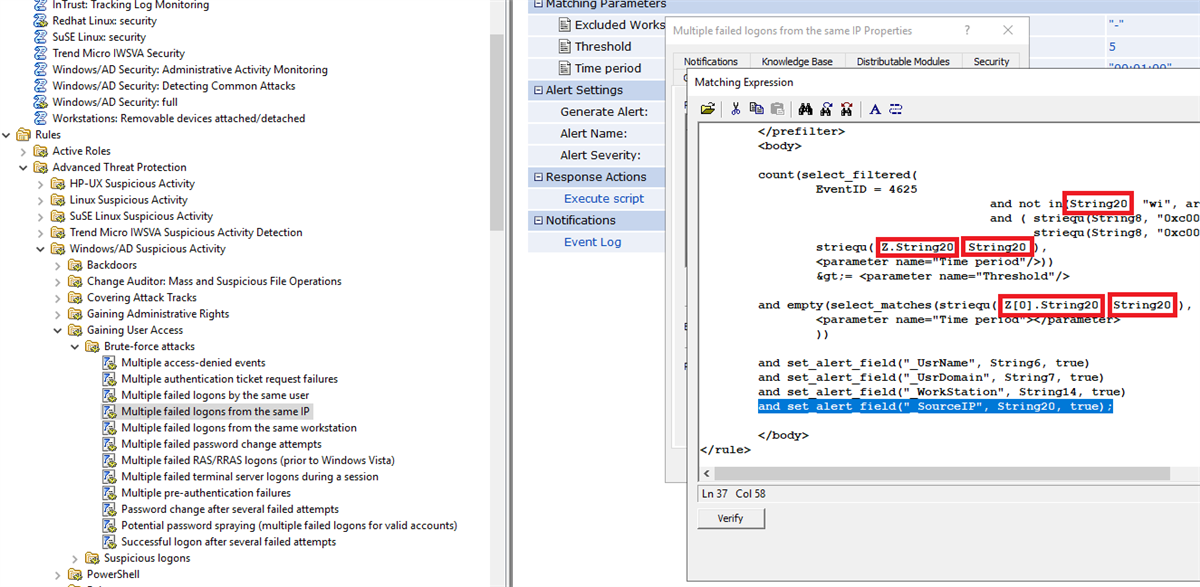
Windows日志中的事件使用所谓的InsertionString。查看事件ID 4625的匹配项 (这是系统登录失败),您将看到我们感兴趣的字段存储在InsertionString14(工作站名称)和InsertionString20(源网络地址)中。在Internet遭受攻击时,工作站名称为字段的字段很可能为空,因此对这个地方很重要替换源网络地址中的值。
事件4625的文本如下所示
An account failed to log on.
Subject:
	Security ID:		S-1-5-21-1135140816-2109348461-2107143693-500
	Account Name:		ALebovsky
	Account Domain:		LOGISTICS
	Logon ID:		0x2a88a
Logon Type:			2
Account For Which Logon Failed:
	Security ID:		S-1-0-0
	Account Name:		Paul
	Account Domain:		LOGISTICS
Failure Information:
	Failure Reason:		Account locked out.
	Status:			0xc0000234
	Sub Status:		0x0
Process Information:
	Caller Process ID:	0x3f8
	Caller Process Name:	C:\Windows\System32\svchost.exe
Network Information:
	Workstation Name:	DCC1
	Source Network Address:	::1
	Source Port:		0
Detailed Authentication Information:
	Logon Process:		seclogo
	Authentication Package:	Negotiate
	Transited Services:	-
	Package Name (NTLM only):	-
	Key Length:		0
This event is generated when a logon request fails. It is generated on the computer where access was attempted.
The Subject fields indicate the account on the local system which requested the logon. This is most commonly a service such as the Server service, or a local process such as Winlogon.exe or Services.exe.
The Logon Type field indicates the kind of logon that was requested. The most common types are 2 (interactive) and 3 (network).
The Process Information fields indicate which account and process on the system requested the logon.
The Network Information fields indicate where a remote logon request originated. Workstation name is not always available and may be left blank in some cases.
The authentication information fields provide detailed information about this specific logon request.
	- Transited services indicate which intermediate services have participated in this logon request.
	- Package name indicates which sub-protocol was used among the NTLM protocols.
	- Key length indicates the length of the generated session key. This will be 0 if no session key was requested.
此外,将源网络地址值添加到事件文本。

接下来,您需要添加一个脚本,该脚本将阻止Windows防火墙中的IP地址。下面是可用于此目的的示例。
防火墙配置脚本
param(
         [Parameter(Mandatory = $true)]
         [ValidateNotNullOrEmpty()]
         [string]
         $SourceAddress
)

$SourceAddress = $SourceAddress.Trim()
$ErrorActionPreference = 'Stop'
$ruleName = 'Quest-InTrust-Block-Failed-Logons'
$ruleDisplayName = 'Quest InTrust: Blocks IP addresses from failed logons'

function Get-BlockedIps {
    (Get-NetFirewallRule -Name $ruleName -ErrorAction SilentlyContinue | get-netfirewalladdressfilter).RemoteAddress
}

$blockedIps = Get-BlockedIps
$allIps = [array]$SourceAddress + [array]$blockedIps | Select-Object -Unique | Sort-Object

if (Get-NetFirewallRule -Name $ruleName -ErrorAction SilentlyContinue) {
    Set-NetFirewallRule -Name $ruleName -RemoteAddress $allIps
} else {
    New-NetFirewallRule -Name $ruleName -DisplayName $ruleDisplayName -Direction Inbound -Action Block -RemoteAddress $allIps
}
现在,您可以更改规则的名称及其描述,以免日后混淆。

现在,您需要添加此脚本作为对规则的响应,启用规则,并确保在实时监控策略中启用了相应的规则。代理必须具有运行已启用的响应脚本的能力,并且必须指定正确的参数。

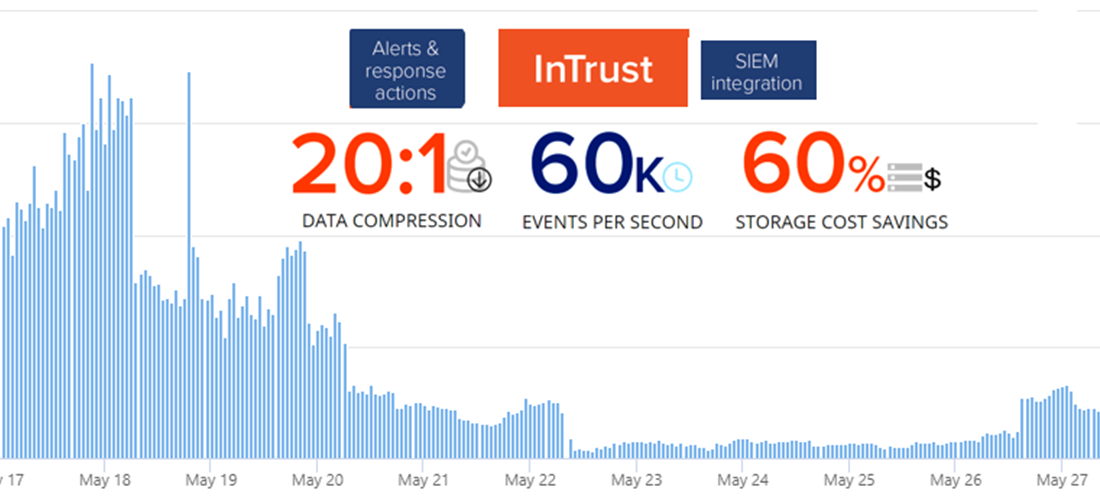
进行设置后,不成功的授权数量减少了80%。利润?还有什么!

有时会再次出现少量增加,但这是由于新的攻击源的出现。然后,一切又开始下降。
在一周的运行中,防火墙规则中包含66个IP地址。

下表列出了用于登录尝试的10个常用用户名。
| 用户名
|
|
|
| administrator
|
1220235
|
40.78
|
| admin
|
672109
|
22.46
|
| user
|
219870
|
7.35
|
| contoso
|
126088
|
4.21
|
| contoso.com
|
73048
|
2.44
|
| administrador
|
55319
|
1.85
|
| server
|
39403
|
1.32
|
| sgazlabdc01.contoso.com
|
32177
|
1.08
|
| administrateur
|
32377
|
1.08
|
| sgazlabdc01
|
31259
|
1.04
|
在评论中告诉我们您对信息安全威胁的响应是如何构成的。您正在使用什么系统,它有多方便。
如果您有兴趣在工作中看到InTrust,请在我们网站的反馈表中提出要求或给我发送电子邮件。
阅读我们有关信息安全性的其他文章:
识别勒索软件攻击,访问域控制器并尝试抵御这些攻击
Windows工作站的日志中可能有用的(热门文章)
无需钳子和磁带A即可跟踪用户生命周期
谁干的?我们自动化信息安全审核
SIEM- Central Log Management (CLM)
, .